
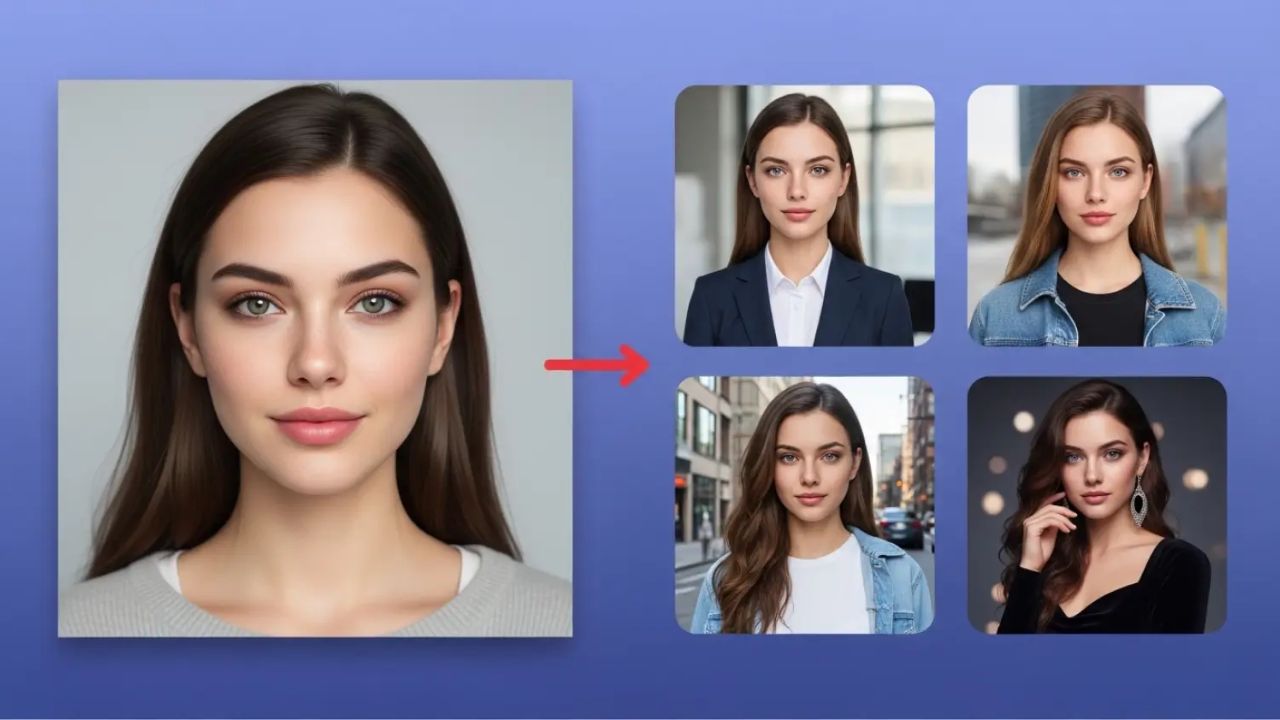
One of the biggest challenges creators face when using AI image generators is character consistency. You generate a great character once, but the next image looks like a completely different person. For storytellers, marketers, game designers, educators, and brand creators, this inconsistency can break trust and visual continuity.
The good news is that consistent characters are possible with AI image generators if you follow the right approach. This guide explains practical, repeatable methods that actually work, even if you are a beginner.
Table of Contents
Why Character Consistency Is Difficult in AI Images
AI image generators create visuals based on probability, not memory. Unless you guide the system carefully, it treats each prompt as a new request. Small changes in wording, style, or resolution can result in noticeable differences in facial structure, clothing, or body proportions.
Consistency problems usually happen because of:
- Vague or changing prompts
- Missing character descriptions
- Style drift between generations
- Random seed changes
- Model updates or version differences
Understanding this limitation is the first step toward controlling it.
Start With a Strong Character Definition
Before generating multiple images, define your character clearly. Think of this as a written character profile that never changes.
Include:
- Age range and gender expression
- Skin tone, facial features, hair color and hairstyle
- Body type and posture
- Clothing style and accessories
- Personality traits that influence expression
Example structure you should internally reuse:
A 28-year-old female character with short black hair, warm brown skin, oval face, soft jawline, expressive eyes, wearing minimal modern clothing, calm and confident expression.
The more specific and repeatable your description is, the more consistent your results will be.
Use the Same Base Prompt Every Time
Consistency starts with repetition. Create a base prompt and reuse it exactly for every image.
Instead of rewriting from scratch, copy-paste your base prompt and only change the scene or action.
Base prompt example:
A realistic portrait of a 28-year-old woman with short black hair, warm brown skin, oval face, soft jawline, expressive eyes, minimal modern clothing, calm confident expression, studio lighting, high detail, natural skin texture.
Then add variations like:
- sitting at a desk
- walking outdoors
- speaking on a podcast
- cinematic lighting
Never change the core character description.
Lock the Style and Visual Aesthetic
Style changes can make the same character look like someone else. Always keep the visual style fixed.
Decide early:
- Realistic, cinematic, anime, illustrated, or 3D
- Lighting style (soft light, studio light, dramatic shadows)
- Camera angle (close-up, medium shot, full body)
Mention the style in every prompt using the same words. Avoid mixing artistic terms like “anime” in one image and “realistic photography” in another unless intentional.
Use Seed Numbers When Available
Many AI image generators allow you to set or reuse a seed number. A seed controls randomness.
If your tool supports it:
- Generate the first image
- Save the seed number
- Reuse that seed for future images
This dramatically improves consistency, especially for facial features. If you change the seed, expect visible differences.
Generate Reference Images First
Instead of jumping into full projects, generate 5 to 10 reference images of your character.
Use:
- Neutral poses
- Clear lighting
- Minimal expressions
Select the best one and treat it as your visual anchor. Some tools allow image-to-image generation where you upload a reference image and guide the AI to stay close to it. This is one of the most reliable ways to maintain consistency.
Control Clothing and Accessories Carefully
Clothing is one of the fastest ways AI characters drift.
If you want consistency:
- Describe clothing clearly
- Avoid changing colors randomly
- Keep accessories consistent
If you want wardrobe changes, do them intentionally and describe them clearly while keeping everything else the same.
Example:
Same character, same facial features, same hairstyle, wearing a dark blue jacket instead of a white shirt.
Avoid Overloading the Prompt
Too many instructions can confuse the model and reduce consistency.
Common mistakes:
- Adding unnecessary style keywords
- Mixing multiple art styles
- Using conflicting lighting terms
Keep prompts clean and focused. Character first, style second, scene last.
Use Negative Prompts When Possible
Negative prompts help remove unwanted variation.
Examples of useful negative prompts:
- different face
- different hairstyle
- exaggerated facial features
- cartoonish proportions
This tells the model what not to do, which helps stabilize results.
Stay Consistent Across Model Versions
AI tools update frequently. A character generated in one version may look different after an update.
Best practices:
- Stick to one model version for a project
- Regenerate references if the model changes
- Document your settings
If consistency matters, avoid switching tools mid-project.
Test, Save, and Document Everything
Professional creators treat AI generation like a workflow, not a one-click action.
Always save:
- Base prompts
- Seed numbers
- Model versions
- Reference images
This allows you to recreate or adjust characters later without starting from zero.
Final Thoughts
Creating consistent characters using AI image generators is less about luck and more about discipline. Clear character definitions, repeatable prompts, locked styles, and controlled randomness are the keys.
Once you build this habit, AI becomes a powerful character design tool rather than an unpredictable experiment. Whether you are building a brand mascot, story character, or educational visuals, consistency is achievable with the right process.

Mark Chen is a technical product writer and editor who has spent a decade designing and documenting writing tools, editor plugins, and productivity workflows for publishers and SaaS teams. His professional background includes product management for AI-assisted drafting features, leading UX writing initiatives, and creating in-depth tool guides and tutorials. Expertise: content strategy, user-focused documentation, prompt engineering for writing assistants, and tutorial design. He has authored widely used tool guides, contributed to industry blogs, and led workshops.