
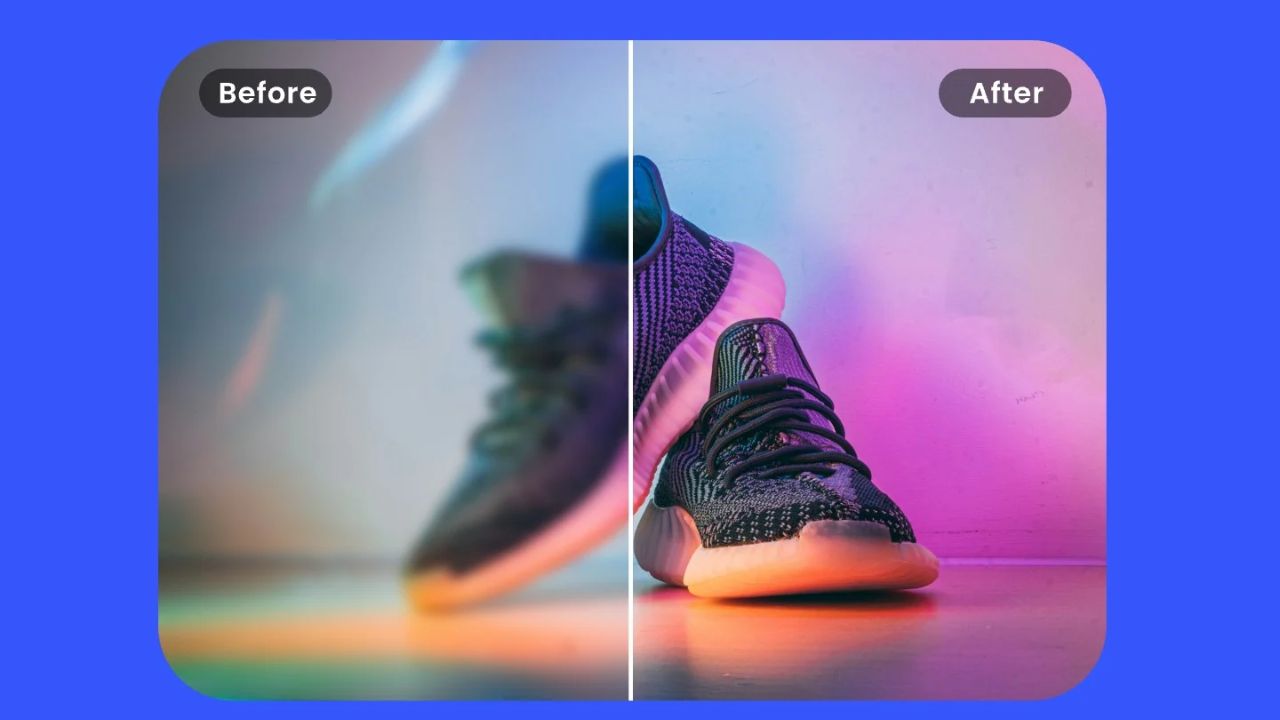
Low-resolution images are one of the most common problems creators, marketers, and everyday users face. Old photos, compressed social media images, screenshots, thumbnails, and low-quality exports often look blurry, pixelated, or unusable on modern screens. This is where AI image upscaling tools have changed the game.
Unlike traditional resizing methods that simply stretch pixels, AI upscaling tools use machine learning to rebuild missing detail, sharpen edges, and enhance textures. The result is an image that looks clearer, more natural, and often close to native 4K quality.
Table of Contents
AI image upscaling is the process of increasing image resolution using trained neural networks. These models analyze patterns like edges, textures, lighting, and shapes, then predict how high-resolution details should look.
Instead of guessing pixel values mathematically, AI tools learn from millions of high-quality images. This allows them to recreate skin texture, hair strands, fabric detail, and sharp outlines far better than traditional interpolation.
In simple terms, AI upscaling does not just resize an image. It reconstructs it.
Why Traditional Upscaling Fails
Traditional upscaling methods such as bicubic or nearest-neighbor scaling only stretch existing pixels. When you increase size this way, images become:
- Blurry and soft
- Blocky around edges
- Noisy and artifact-heavy
- Unusable for large screens or printing
AI upscalers solve this by understanding image context. A face is treated differently than text, and a landscape differently than a logo. This context awareness is the key reason AI-based tools outperform older techniques.
How AI Upscaling Turns Images Into 4K
Most AI upscaling tools work in multiples such as 2×, 4×, or even 8×. A 720p image can often be upscaled to 4K resolution while maintaining clarity.
The process usually includes:
- Resolution enhancement
- Edge refinement
- Noise reduction
- Texture reconstruction
- Color correction and sharpening
Some advanced tools apply different enhancement models depending on whether the image is a portrait, illustration, product photo, or artwork.
Best Use Cases for AI Image Upscaling
AI upscaling is not limited to professional designers. It is now widely used across many fields.
Common use cases include:
- Restoring old family photos
- Improving social media images
- Enhancing e-commerce product photos
- Upscaling YouTube thumbnails
- Preparing images for large displays
- Printing posters or banners
- Fixing compressed website images
For creators, this means fewer reshoots and more value from existing assets.
Key Features to Look for in AI Upscaling Tools
Not all AI upscalers are equal. The best tools usually include several important features.
Look for tools that offer:
- Multiple upscaling levels (2×, 4×, 8×)
- Face enhancement or portrait mode
- Noise and artifact removal
- Batch processing support
- Control over sharpness and detail
- Support for JPG, PNG, and WEBP formats
Advanced tools may also include specific modes for anime, illustrations, or text-heavy images.
Free vs Paid AI Image Upscaling Tools
Free AI upscalers are useful for quick tests and casual needs. However, they often come with limitations such as watermarks, file size caps, or lower processing quality.
Paid tools usually provide:
- Higher resolution limits
- Better detail reconstruction
- Faster processing
- Commercial usage rights
- Batch uploads
If you are using upscaled images for business, branding, or publishing, paid tools are usually the safer and higher-quality choice.
Common Mistakes People Make With AI Upscaling
AI upscaling is powerful, but it is not magic. Many users expect perfect results without understanding limitations.
Common mistakes include:
- Upscaling extremely blurry or tiny images
- Over-sharpening faces and skin
- Using the wrong model for the image type
- Ignoring noise reduction settings
- Upscaling text-heavy images without text mode
For best results, always start with the highest quality original image you have.
Can AI Upscaling Replace High-Resolution Photography
AI upscaling can dramatically improve images, but it does not fully replace real high-resolution photography. It works best when there is enough visual information for the model to reconstruct details accurately.
For marketing visuals, social media, web content, and digital displays, AI upscaled images are often more than sufficient. For fine art printing or technical imaging, native high-resolution sources are still preferred.
Ethical and Copyright Considerations
When upscaling images, always consider ownership and usage rights. AI tools do not change copyright status. If you do not own or have permission to use an image, upscaling it does not make it legally safe.
For historical or personal photos, AI upscaling can be a powerful restoration tool. For commercial projects, always use licensed or original images.
Final Thoughts
AI image upscaling tools have made it possible to turn low-quality images into sharp, usable 4K visuals. What once required complex editing skills is now accessible to beginners, creators, and businesses alike.
When used correctly, AI upscalers save time, preserve old memories, improve visual quality, and unlock new creative possibilities. The key is choosing the right tool, using the right settings, and understanding what AI can realistically enhance.
If you work with images regularly, AI upscaling is no longer optional. It is quickly becoming a standard part of modern creative workflows.

Lena Park is a creative technologist specializing in image generation and audio tools, with over eight years leading multimodal AI projects for startups and media studios. Her professional background includes building GAN- and diffusion-based pipelines, designing sample-based synthesis systems, and consulting on audio-visual product roadmaps. Expertise: generative image modeling, neural audio synthesis, model evaluation, and UX for creative tools. She has published white papers on multimodal workflows, spoken at industry conferences, and contributed to open-source toolkits.